Point and Figure – Forex

Cute Point & Figure indicator for MetaTrader 4

Cute PnF indicator v 1.3 released!

------------------------------------------------------------------------------------------------------------

Hello, newest version – 1.3 of Cute Point and Figure indicator is released!

What’s new in v1.3:
* Added ability to add fully customizable(width, period, color) moving averages
* Added mail alert when new column of X’s or O’s appears
* Added ability to view each column’s reverse time
* CPU using optimization
* Additional 4 templates for boxes and X/O views


The newest version of indicator can be found at “DOWNLOADS” section.
Watch installation & short demonstration of Cute PnF v1.3 video below:

Your Ad Here

For additional options explanatory visit explanation page: HERE

Your Ad Here
Comments (4)

Point and Figure patterns added

------------------------------------------------------------------------------------------------------------

Hello, nice to see you again!

Point and Figure pattern is special X’s and O’s column’s formation, which give us more clear and filtered view of a chart, which we trade on.

Decision – when to “buy/sell” or “wait” – is everyones individual thing. There are a lot of factors which may influence trader to make his own trading decisions when trading with Point and Figure charts. One of such factors are – Point and Figure patterns(meaning described above). These patterns give us opportunity to detect common “buy/sell” or “wait” signals.

Point and Figure patterns

So, I wish to inform you about new blog section – point and figure patterns (search in upper menu under “Point and Figure” button. This blog section will include almost all of the Point and Figure charting patterns.
For more details of pnf charting patterns follow these links:
* bullish pnf patterns
* bearish pnf patterns
* bullish pnf trend reversal patterns
* bearish pnf trend reversal patterns
* all pnf trend reversal patterns
* “wait and” see patterns

Remember that patterns are only one of few things we look at when making trading decisions. For example – when the market indicators are suggesting that demand is
in control of the overall market, then the bullish patterns work out better than bearish and vise versa – when the main market indicators are suggesting supply is in control of the overall market, then the bearish patterns work out better than bullish. Patterns are especially useful in determining entry points and logical stop loss points.

Hope this info will help you to spot buy/sell signals more clearly and to trade more accurately!
See you soon mates!

Comments (0)

New blog section – 1000 free forex indicators

------------------------------------------------------------------------------------------------------------

Hi all, i have updated forexpnf.info blog a little bit.
Now in upper menu you can find “Other Forex Indicators” section, which includes about ~1200 freely downloadable indicators for Meta Trader 4 platform. So, feel free to explore more than thousand indicators  list and to download any indicator you need for free. Indicators starts with a letter:
click here
for – A, B, C, D, E, F, G, H
click here
for – I, J, K, L, M, N, O, P
click here for - R, S, T, U, V, W, X, Y, Z
click here for – all other.

If you don’t know  how to add indicator to your MetaTrader4 platform, please read short instruction here: how to add indicator to mt4 platform. Whole indicator pack was collected by me during last 4 years.  The indicators are collected from all around the internet (forex forums, portals, chats, friends etc…)

* To authors of listed indicators: If you think that your indicator should be removed from this website – please contact me.
Comments (2)

Moving Avarage and email alert feature addition.

------------------------------------------------------------------------------------------------------------

Hi, I’m working on MA(moving average) addition to Cute PnF.
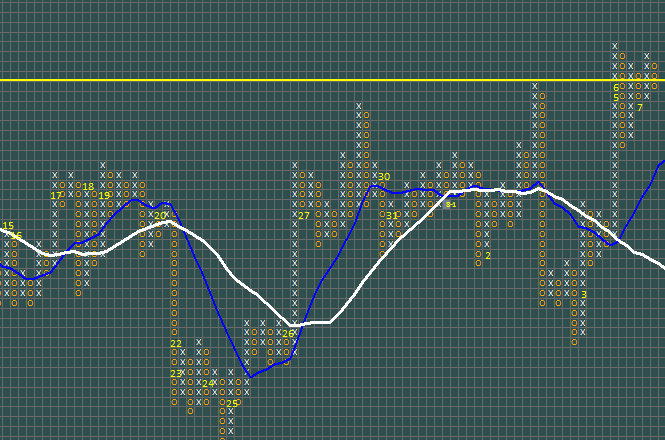
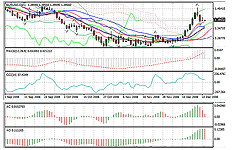
There will be two customizable moving averages (look at the picture below).

Newest version will also include  OnNewColumn email alert feature. Cute Point and Figure indicator  will send an a mail massage automatically when new column of Xs or Os appears.

Check it out at the picture below:

Comments (4)

How to deal with trendlines.

------------------------------------------------------------------------------------------------------------

Hi, i’ve get an question from David, who asked me: “Is there a way to make the grid/box a perfect square. It makes 45deg lines easier.”
I thought – it can be useful to others to know  too – how to deal with not perfect grid/box square.

So there is short instruction how i deal with that:

1. Zoom in(at max) cute pnf chart’s window – to see the bigger boxes. Start dragging trend from edge to edge of the grid(look prints creen below).
cute pnf dealing with trend lines
2. Go to attached trend properties and rename it to “trend1″.  (why? – find answer here – plotting trend-lines)
How to deal with point and figure indicator trend lines

3. Click right mouse button on the attached … Read more

Comments (1)

Site was under maintenance 04.05-07

------------------------------------------------------------------------------------------------------------

Forexpnf.info was down for 2-3 days.

This issue was due to moving from one hosting to another(really fast one).

It is possible that some of the comments and voting results are lost…
Sorry for the inconveniences.

Now it must be stable!

Comments (0)

New Cute PnF indicator v1.2 features discovered!

------------------------------------------------------------------------------------------------------------

Hello everybody.

As i said some time before – i am still working under the 1.3 version of Cute Point and Figure indicator. There are still a lot of things that must be done…

In spite of this, i’ve discovered really helpful thing for owners of Cute PnF indicator v1.2 .
So, Cute PnF indicator v1.2 is able to hold(in place) on the chart not only trend lines, but also: Fibs, Gann Lines, Gann Fans and Gann Grids. If you are not familiar with Gann tools, you can read about it here.

Instruction is almost the same as about plotting trendlines: here.
The main difference is that you’ll have to change plotted object’s(Fibs, Gann Line/Fan/Grid) name to trend1, trend2, trend3 or trend4 .
Remember, you are able to plot up to 4 objects on one chart. Those four objects will not shift and not disappear from the chart.
Types of objects which are suitable for Cute PnF v1.2 chart: Trend Lines, Fibonacci Retracement, Gann Fan, Gann Line, Gann Grid and all other object based on two coordinates(Fibonacci Time Zones, Arcs, Fans etc.).

Short instruction:
1. Plot one of the mentioned above objects(use standard MT4 trend plotting tool or INSERT>>Gann / Fibonacci menu)
2. Go to it’s properties:
2.1. double click to select plotted object(or use object list)
2.2. then right click on it
2.3. choose object’s properties
2.4. find section Name and change it to: trend1, also all leters must be lower-case
2.5. set other options if needed(e.g: can uncheck ray feature) and press OK

That’s it for now!
Have a great trading buddies!

Comments (0)

Plotting trend-lines with Cute Point and Figure indicator v.1.2 (instructional video)

------------------------------------------------------------------------------------------------------------

Good evening :) !

Trend-lines plotting instructional video is finished, watch it below or here:
http://www.youtube.com/watch?v=_ZLM3dZZi_M

For written step-by-step instructions – how to plot trend-lines with Cute PnF v.1.2 – go to new section of blog “Plotting trend-lines

Original point and figure method’s trend-lines plotting rules, here >> here <<

Comments (6)
 Page 1 of 3  1  2  3 »

Friends:

www.tradergoods.com
A simple way to collaborate and share technical indicators, EAs and trading systems.
 
www.whatismybrowser.net
Check your browser online:
version, flash, javascript, cookies availability, screen resolution, IP address, network speed etc.

Purchasers

Waldemar elsenbach
Jose Acuña Zornosa
Bodo Böker
John Kennedy
Evelyn Jansen van Vuuren
Daniel Kight
Bostjan Drobic
Josef Strauss
Heinz Zeh
Angel Marinov
Andreas Schels
Chris Phillips
Sandro Skansi
Charles Callahan
Mohd Faizal Mohd Sayed
Ryoichi Hino
Vickie Thomas
V.S. Jeremy
A van Lille
明 于
Michael Bmt
Andrew Cavaliere
Vincent Maung
Sascha Fahrngruber
Taiwei Ko
Christian Rothuber
Renzo Marcato
Shakiru Makanjuola
Wim Lindeboom
Vlad Florea
Sibonile Lungah
Mark Nicoll
Lawrence Durham
Perry Brimah
朴 龙浩
Lawrence Standard
Mitsuhiko Endo
Berke Karahan
Bilescu Delia
Larry Willerton
Howard Blakely
Igor Bessarab
John Kleinjung
Mark Wood
Joe Wilkinson
Richard Nastawa
Leduc Ludovic
Peeters Nico
Mike Power
Julio Cesar Peqa Blasco
Trevor Hodge
Adrian Hussey
Sebastian Brauch
Martin Butler
Donatella Giacinti
Jacob Nicholson
Mario Vlaskamp
Marcel Fobian
Angel Luis Fernandez
Igor Bessarab
John Kleinjung
James Coston
Henry Klein
Grant Parkis
Carl WilliamsCARL
Philip Mark Ashford
Csaba David
Akira Nagashima
Hans Nordstrom
Ian Pascoe-Webbe
Xiao Hu
Richard Nastawa
Wai Kean Chow
Peter Kadar
Sherita Birtantie
Michael Steinbach
Edward Daniel
Sid Ali Daimellah
Matthew Fletcher
Hristiyan Dimitrov
Arthur Lowe
Don Graham
Colin South
Zacharias Allred
Tee Foo
Wendy Comp
Lena Beuten
John Greenwood
Evangelos Sopikiotis
Daniel Chew
Gijsbert Clements
Marek Becht
Eric Petersen
Ignas Banevicius
William Silk
Mark Kamrath
Albert Hui
Mohamed Shaikh
James H Campbel
Todd Gillam
Michael Kelsey
Henry Kwushue
Robert Turberville
Heinz Zeh
Kenneth Saladaga
Chaiwat Trakuekul
Ratu Logavatu
Clayton Khan
Jacob Mitchell
Wimar Berg
Angshul Moktan
John M.
Stijn de Wijs
Tobias Braun
Kenneth Greaves
Anghel Catalin
Mark White
Graham Bray
Manish Makhija
Flint Lock
Firdaus Mat Nayan
Peter Jan Beresinski
Dale Calder
Johnny Ming
Zev Laibman
David Hill
Dilip Abhyankar
Lemoil Howard
Alan Rafael M Dias
Mohammed Islam
Diane Reynolds
Patrick Ferguson
Shaun McKernie
Alvaro Benlloch
Stephen Snow
Doug Long
David Wilson
Kelly Cossey
Joseph Hunter
Suleyman Fernando Tamayo
Jacobus Vermaak
Skyler Christensen
Mark Conway
Robert Morgan
Mitchell Giangobbe
Philippe Mourand
Lars Henrriksson
Spiridon Kontogeorgis
Peter Mikelis Jr
Shailesh Jawale
Richard Kershaw
Chris Steadman
Marc Weedbrook
Marko Nikolic
Phil Stanwood
Rick - HealthSprings
Ali Almasabain
Barry Mason
Dragos Dinescu
Steve Knighton
Charles Ayers
Andy Garcia
John St Luce
Ian Douglas
Panlop Albert
Reese Rae
Potomac Disc & Media Maker
Leduc Ludovic
Nicolas Jaisson
Frederick Schwager
Mickael Edberg
Joseph Slaga
Brett Davies
Euclides Rosario
Neil Jones
Nicholas Coston
Gregnmobaskin
Mohacsi Andres
Steve Arnold
Joachim Werner
Patrick Laug
Richard Kershaw
Edward Daniel
Richard S. (donation)
Antony Shea (donation)
Yoshihiro Teraji (donation)
David R Williams (donation)
Adrian-Bogdan(j0n3s) (donation)
John Kleinjung (donation)
Angel Luis Fernandez (donation)
明 于br /

Polls

Are you satisfied with Cute Point and Figure indicator?

View Results

Loading ... Loading ...
Version 1.3
Cute Point and Figure indicator v.1.3 (4-digit)

* for 4 digit price MetaTrader 4 plaftorm (i.e 1.2513)

Price: $29.75
Cute Point and Figure indicator v.1.3 (5-digit)

* for 5 digit price MetaTrader 4 plaftorm (i.e 1.43312)

Price: $29.75

Version 1.2
Cute Point and Figure indicator v.1.2 (4-digit)

* for 4 digit price MetaTrader 4 plaftorm (i.e 1.2513)

Price: $29.99
Price: $20.75
Cute Point and Figure indicator v.1.2 (5-digit)

* for 5 digit price MetaTrader 4 plaftorm (i.e 1.43312)

Price: $29.99
Price: $20.75

---------------------------------
Free version (1.1) of indicator here:
DOWNLOADS